The world of software development is evolving faster than ever. Companies now expect applications to be built, tested, deployed, and updated continuously with minimal downtime. This demand has made DevOps one of the most valuable skills in today’s technology industry.
At the heart of every successful DevOps engineer lies a powerful toolkit. These tools automate repetitive tasks, improve collaboration, accelerate software delivery, and ensure systems remain reliable and secure.
Whether you’re just beginning your DevOps journey or preparing for your next cloud engineering role, mastering the right tools can significantly boost your career.
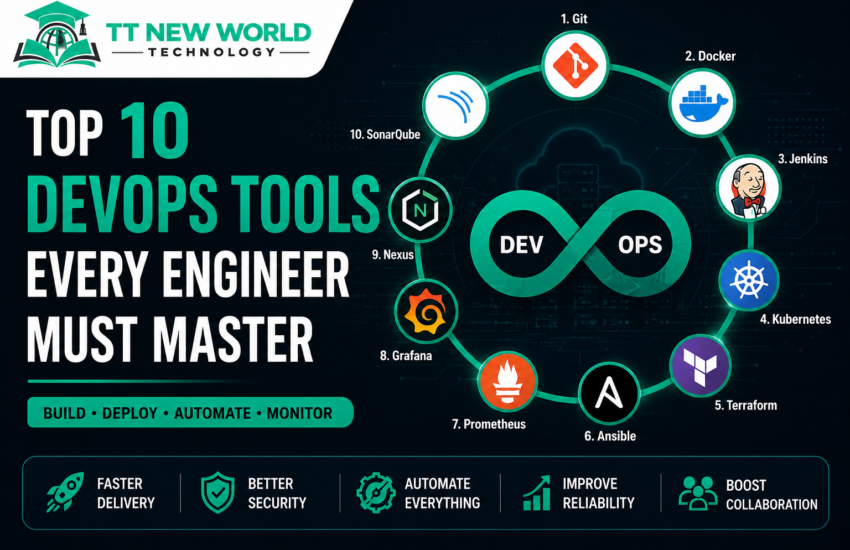
In this guide, we’ll explore the Top 10 DevOps tools every engineer should master in 2026, why they matter, and how they work together in a modern DevOps pipeline.
Table of Contents
- What Are DevOps Tools?
- Why DevOps Tools Matter
- The Top 10 DevOps Tools
- How These Tools Work Together
- Which Tools Should Beginners Learn First?
- Career Benefits
- Frequently Asked Questions
- Final Thoughts
What Are DevOps Tools?
DevOps tools are software solutions that help automate, manage, and streamline every stage of the software development lifecycle.
They support activities such as:
- Source code management
- Continuous Integration (CI)
- Continuous Delivery (CD)
- Infrastructure provisioning
- Containerization
- Orchestration
- Configuration management
- Monitoring
- Logging
- Security
Instead of performing these tasks manually, DevOps engineers use specialized tools to increase speed, reliability, and consistency.
Why DevOps Tools Matter
Modern software teams deploy applications dozens—or even hundreds—of times every day. Without automation, this would be nearly impossible.
DevOps tools help organizations:
- Deliver software faster
- Reduce human error
- Improve collaboration
- Automate repetitive tasks
- Increase deployment reliability
- Scale applications effortlessly
- Detect problems before users do
- Strengthen security and compliance
Mastering these tools makes you a valuable asset in virtually any technology organization.
1. Git – The Foundation of Version Control
Git is the most widely used version control system in the world. It allows developers to track code changes, collaborate with teammates, and maintain a complete history of every project.
Why Git Matters
Imagine building an application with multiple developers working on the same codebase. Git ensures everyone can work independently while safely merging their changes.
Key Features
- Version control
- Branching and merging
- Pull requests
- Rollbacks
- Collaboration
- Distributed repositories
Popular Platforms
- GitHub
- GitLab
- Bitbucket
Every DevOps Engineer should master Git before learning any other tool.
2. Docker – Build Once, Run Anywhere
Docker revolutionized software deployment by introducing lightweight containers.
A container packages an application together with all its dependencies, ensuring it runs consistently across development, testing, and production environments.
Benefits
- Portable applications
- Faster deployments
- Smaller resource footprint
- Simplified application packaging
- Consistent environments
Essential Docker Skills
- Docker Images
- Docker Containers
- Dockerfiles
- Docker Compose
- Docker Hub
- Volumes
- Networking
Docker is considered a must-have skill for every modern DevOps professional.
3. Jenkins – The Automation Server
Jenkins is one of the most popular Continuous Integration and Continuous Delivery (CI/CD) tools.
It automatically builds, tests, and deploys applications whenever code changes are pushed to a repository.
Jenkins Can Automatically
- Compile applications
- Run unit tests
- Execute security scans
- Deploy applications
- Send notifications
- Trigger automated workflows
Key Concepts
- Pipelines
- Agents
- Stages
- Plugins
- Build Triggers
- Shared Libraries
Jenkins significantly reduces manual effort while improving software quality.
4. Kubernetes – Container Orchestration
Running one Docker container is easy.
Managing thousands of containers across multiple servers is not.
That’s where Kubernetes comes in.
Originally developed by Google, Kubernetes automates the deployment, scaling, networking, and management of containerized applications.
Kubernetes Features
- Automatic scaling
- Self-healing
- Load balancing
- Rolling updates
- Service discovery
- High availability
- Resource optimization
If Docker is the engine, Kubernetes is the traffic controller.
5. Terraform – Infrastructure as Code
Terraform allows engineers to provision cloud infrastructure using code instead of manually clicking through cloud consoles.
You can create:
- Virtual Machines
- Networks
- Databases
- Storage
- Load Balancers
- Kubernetes Clusters
Advantages
- Repeatable deployments
- Version-controlled infrastructure
- Multi-cloud support
- Reduced configuration errors
- Faster provisioning
Terraform supports AWS, Azure, Google Cloud, VMware, Oracle Cloud, and many other providers.
6. Ansible – Configuration Management Made Easy
Ansible automates software installation, server configuration, application deployment, and maintenance.
Unlike many configuration management tools, Ansible is agentless, making it simple to deploy and manage.
Common Use Cases
- Server configuration
- User management
- Patch management
- Software installation
- Security hardening
- Application deployment
Ansible uses easy-to-read YAML playbooks, making it beginner-friendly.
7. Prometheus – Monitoring Your Infrastructure
Monitoring is critical in DevOps.
Prometheus collects metrics from servers, applications, databases, and Kubernetes clusters.
It answers questions like:
- Is my server healthy?
- How much CPU is being used?
- Is memory running low?
- Are applications responding normally?
Prometheus enables proactive issue detection before users are affected.
8. Grafana – Visualize Everything
Prometheus collects metrics.
Grafana turns those metrics into beautiful dashboards.
Engineers use Grafana to monitor:
- CPU usage
- Memory consumption
- Disk utilization
- Application response times
- Database performance
- Network traffic
- Business metrics
Its real-time dashboards make troubleshooting much easier.
9. Nexus Repository
Every software project depends on libraries and artifacts.
Nexus Repository Manager stores and manages these components securely.
Instead of downloading dependencies from the internet every time, organizations use Nexus to maintain a centralized repository.
Benefits
- Faster builds
- Improved security
- Dependency management
- Artifact storage
- Version control
- Integration with CI/CD pipelines
Nexus is commonly integrated with Jenkins for automated deployments.
10. SonarQube – Code Quality & Security
Writing code is one thing.
Writing clean, secure, maintainable code is another.
SonarQube automatically analyzes source code to identify:
- Bugs
- Security vulnerabilities
- Code smells
- Duplicated code
- Maintainability issues
- Technical debt
It integrates seamlessly into CI/CD pipelines, ensuring only high-quality code reaches production.
How These Tools Work Together
A modern DevOps workflow often looks like this:
- Developer writes code.
- Code is pushed to Git.
- Jenkins automatically starts a pipeline.
- SonarQube analyzes the code for quality and security.
- The application is packaged into a Docker container.
- Nexus stores the build artifacts.
- Terraform provisions the required cloud infrastructure.
- Ansible configures the servers.
- Kubernetes deploys and manages the containers.
- Prometheus monitors the environment.
- Grafana displays dashboards and alerts.
This automated workflow enables rapid, reliable, and repeatable software delivery.
Which Tools Should Beginners Learn First?
If you’re new to DevOps, follow this learning path:
- Linux Fundamentals
- Git & GitHub
- Bash or Python Scripting
- Docker
- Jenkins
- Kubernetes
- Terraform
- Ansible
- Prometheus
- Grafana
- SonarQube
- Nexus Repository
Learning in this order builds a strong foundation and prepares you for real-world DevOps projects.
Career Opportunities
Mastering these tools can qualify you for roles such as:
- DevOps Engineer
- Cloud Engineer
- Site Reliability Engineer (SRE)
- Platform Engineer
- Infrastructure Engineer
- Automation Engineer
- Release Engineer
- Cloud Architect
- Kubernetes Administrator
These professionals are in high demand across industries, from startups to global enterprises.
Frequently Asked Questions
Do I need to learn all 10 tools?
You don’t need to master them all at once. Start with Git, Docker, Jenkins, and Kubernetes, then gradually expand your expertise.
Which tool is the most important?
Git is the foundation. Without version control, modern DevOps workflows are nearly impossible.
Are these tools free?
Most of these tools are open source or offer free community editions, making them ideal for learning and personal projects.
How long does it take to learn?
With consistent practice and hands-on labs, you can build a solid foundation in 6–12 months. Mastery comes through real-world experience.
Final Thoughts
DevOps is more than a collection of tools—it’s a culture of collaboration, automation, and continuous improvement. The tools covered in this guide form the backbone of modern software delivery and are used by leading organizations around the world.
If you’re serious about building a successful career in DevOps, start with Git, Docker, Jenkins, and Kubernetes, then expand your knowledge into Infrastructure as Code, configuration management, monitoring, and code quality.
At TT New World Technology, our hands-on DevOps training program equips you with practical experience using these industry-standard tools through real-world projects, cloud labs, and expert-led instruction.
Master the right tools today, and become the DevOps engineer companies are looking for tomorrow.
&media=https://ttneworldtechnology.com/wp-content/uploads/2026/06/dc341b5b-1402-4ef1-97c6-bc1da74794ce.png)