
Imagine managing thousands of applications running across hundreds of servers. What happens if one server crashes? How do you automatically replace failed applications? How do you deploy new versions without interrupting users?
These are exactly the problems Kubernetes was built to solve.
Today, companies like Google, Amazon, Netflix, Spotify, Airbnb, and Microsoft use Kubernetes to run millions of containers every day. It has become the industry standard for container orchestration and one of the most valuable skills for DevOps Engineers, Cloud Engineers, Platform Engineers, and Site Reliability Engineers (SREs).
If you’re just getting started, Kubernetes may seem overwhelming with terms like Pods, Nodes, Deployments, Services, and Clusters. The good news is that once you understand the core concepts, Kubernetes becomes much easier to grasp.
In this beginner-friendly guide, we’ll explain how Kubernetes works using simple language, practical examples, and real-world scenarios.
Table of Contents
- What is Kubernetes?
- Why Was Kubernetes Created?
- Containers vs Kubernetes
- Kubernetes Architecture
- Kubernetes Components Explained
- How Kubernetes Works Step-by-Step
- Deploying Your First Application
- Key Kubernetes Objects
- Benefits of Kubernetes
- Common Use Cases
- Best Practices
- Kubernetes Career Opportunities
- Frequently Asked Questions
- Final Thoughts
What is Kubernetes?
Kubernetes (often abbreviated as K8s) is an open-source platform that automates the deployment, scaling, networking, and management of containerized applications.
Think of Kubernetes as the operating system for your applications.
Instead of manually starting containers, monitoring them, restarting failed services, and distributing workloads across servers, Kubernetes handles all of these tasks automatically.
Originally developed by Google based on over a decade of experience running massive production systems, Kubernetes is now maintained by the Cloud Native Computing Foundation (CNCF).
Why Was Kubernetes Created?
Before Kubernetes, applications were often deployed directly onto physical servers or virtual machines. As applications grew, managing them became increasingly difficult.
Common challenges included:
- Server failures causing downtime
- Manual scaling during traffic spikes
- Inconsistent deployments across environments
- Resource waste
- Difficult application updates
Containers, introduced by Docker, solved many deployment issues by packaging applications with all their dependencies.
However, running one container is easy—managing hundreds or thousands of containers across multiple servers is not.
Kubernetes was created to automate this complexity.
Containers vs Kubernetes
Imagine opening a restaurant.
Docker
Docker prepares each meal perfectly.
Every meal contains exactly the same ingredients and is packaged consistently.
Kubernetes
Kubernetes manages the entire restaurant.
It decides:
- Which chef prepares each meal
- Which kitchen has available space
- What happens if a chef gets sick
- How many chefs are needed during busy hours
- How meals are delivered efficiently
Docker creates containers.
Kubernetes manages them at scale.
Understanding Kubernetes Architecture
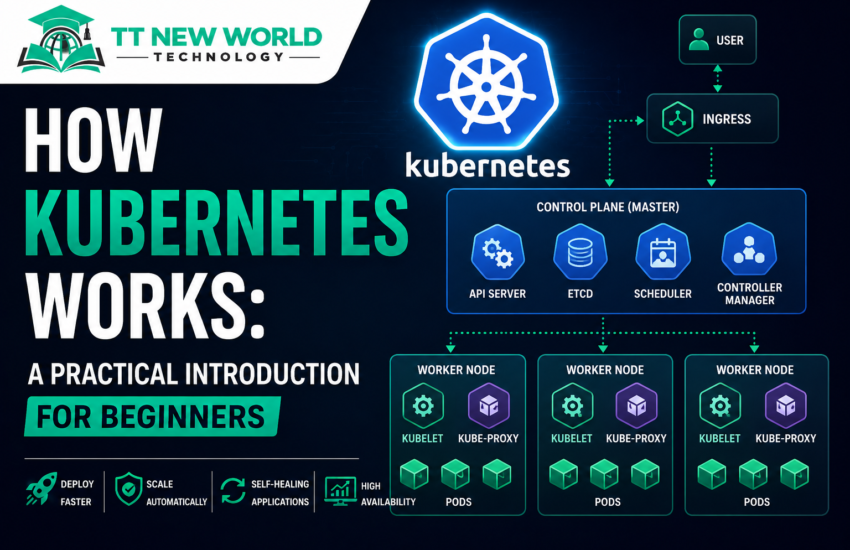
A Kubernetes environment consists of a cluster.
A cluster is made up of two main parts:
Control Plane (Master Node)
The Control Plane acts as the brain of Kubernetes.
It decides:
- Where applications should run
- When to restart failed containers
- How workloads are distributed
- When applications should scale
Worker Nodes
Worker Nodes are the machines that actually run your applications.
Each worker node contains:
- Container Runtime
- Kubelet
- Kube-Proxy
- Pods
Together, these components ensure applications remain available and healthy.
Key Kubernetes Components
Let’s look at the most important pieces of Kubernetes.
API Server
The API Server is the front door to the Kubernetes cluster.
Every command you run—whether from kubectl, the dashboard, or another tool—goes through the API Server.
It validates requests and communicates with the rest of the cluster.
etcd
etcd is Kubernetes’ distributed database.
It stores all cluster information, including:
- Nodes
- Pods
- Deployments
- Secrets
- Configuration
- Networking information
Think of etcd as Kubernetes’ memory.
Scheduler
The Scheduler decides where new Pods should run.
It evaluates factors such as:
- Available CPU
- Available memory
- Resource requests
- Affinity rules
- Taints and tolerations
It ensures workloads are placed on the most suitable worker node.
Controller Manager
The Controller Manager continuously monitors the cluster’s desired state.
If something changes unexpectedly, it automatically corrects it.
For example:
If a Pod crashes, the Controller Manager creates a replacement.
This is one reason Kubernetes is known for its self-healing capabilities.
Kubelet
Every worker node runs a Kubelet.
The Kubelet communicates with the Control Plane and ensures containers are running exactly as instructed.
Kube-Proxy
Kube-Proxy manages networking inside the cluster.
It ensures applications can communicate with one another regardless of which worker node they are running on.
What is a Pod?
A Pod is the smallest deployable unit in Kubernetes.
A Pod typically contains:
- One application container
- Storage resources
- Networking configuration
While Docker manages containers, Kubernetes manages Pods.
Most applications run one container per Pod, although multiple tightly coupled containers can share the same Pod when needed.
What is a Node?
A Node is simply a server that runs Pods.
Nodes may be:
- Physical servers
- Virtual machines
- Cloud instances
Each Node contributes CPU, memory, storage, and networking resources to the cluster.
What is a Deployment?
A Deployment tells Kubernetes:
- Which application to run
- Which container image to use
- How many replicas should exist
- How updates should be performed
For example:
“I want three copies of my web application running at all times.”
If one Pod fails, Kubernetes automatically creates another to maintain the desired state.
What is a Service?
Pods can be created and destroyed frequently, meaning their IP addresses change.
A Service provides a stable network endpoint that applications and users can reliably access.
Types of Services include:
- ClusterIP
- NodePort
- LoadBalancer
- ExternalName
Services ensure traffic always reaches healthy Pods.
How Kubernetes Works: Step-by-Step
Let’s walk through a typical deployment.
Step 1: Build the Application
A developer writes code and packages it into a Docker image.
Step 2: Push the Image
The Docker image is uploaded to a container registry such as:
- Docker Hub
- Amazon ECR
- Azure Container Registry
- Google Artifact Registry
Step 3: Create Deployment YAML
The engineer defines the application’s desired state using a YAML manifest.
This file specifies:
- Container image
- Number of replicas
- Resource requests
- Ports
- Environment variables
Step 4: Apply the Manifest
Using kubectl:
kubectl apply -f deployment.yaml
The request is sent to the Kubernetes API Server.
Step 5: Scheduler Selects a Node
The Scheduler identifies the most appropriate worker node based on available resources and scheduling rules.
Step 6: Pod Starts
The selected worker node pulls the container image and launches the Pod.
Step 7: Service Exposes the Application
A Kubernetes Service routes traffic to the running Pods, providing users with a stable endpoint.
Step 8: Continuous Monitoring
The Control Plane continuously checks the application’s health.
If a Pod crashes or becomes unhealthy:
- Kubernetes removes it.
- A replacement Pod is created automatically.
- Traffic is redirected to healthy Pods.
This self-healing process happens without manual intervention.
Automatic Scaling
One of Kubernetes’ most powerful features is automatic scaling.
During high traffic:
- Kubernetes increases the number of running Pods.
When demand decreases:
- Unused Pods are removed to conserve resources.
This ensures applications remain responsive while optimizing infrastructure costs.
Rolling Updates
Instead of taking an application offline for updates, Kubernetes performs rolling updates.
It gradually replaces old Pods with new ones while keeping the application available to users.
If a problem is detected, Kubernetes can automatically roll back to the previous version.
Benefits of Kubernetes
Organizations choose Kubernetes because it offers:
- Automated deployments
- Self-healing applications
- Automatic scaling
- High availability
- Load balancing
- Resource optimization
- Rolling updates
- Easy rollbacks
- Cloud portability
- Strong ecosystem support
These features make Kubernetes a cornerstone of modern cloud-native applications.
Common Use Cases
Kubernetes is widely used for:
- Microservices
- Web applications
- APIs
- Machine learning platforms
- Data processing pipelines
- CI/CD systems
- Enterprise applications
- Hybrid cloud environments
- Multi-cloud deployments
Best Practices
To use Kubernetes effectively:
- Start with small clusters.
- Define resource requests and limits.
- Use namespaces to organize workloads.
- Store sensitive information in Secrets.
- Monitor cluster health with Prometheus and Grafana.
- Use Helm charts to simplify deployments.
- Regularly update Kubernetes versions.
- Back up etcd data.
Following these practices improves security, reliability, and maintainability.
Career Opportunities
Kubernetes expertise is highly sought after across industries.
Common roles include:
- Kubernetes Administrator
- DevOps Engineer
- Cloud Engineer
- Platform Engineer
- Site Reliability Engineer (SRE)
- Cloud Architect
- Infrastructure Engineer
Many organizations consider Kubernetes knowledge a core requirement for senior cloud and DevOps positions.
Frequently Asked Questions
Is Kubernetes difficult to learn?
Kubernetes introduces several new concepts, but once you understand Pods, Nodes, Deployments, and Services, everything else builds naturally. Hands-on practice is the fastest way to gain confidence.
Do I need Docker before Kubernetes?
Yes. Understanding Docker and container fundamentals provides an excellent foundation before learning Kubernetes.
Which cloud platforms support Kubernetes?
All major cloud providers offer managed Kubernetes services:
- Amazon Elastic Kubernetes Service (EKS)
- Azure Kubernetes Service (AKS)
- Google Kubernetes Engine (GKE)
Is Kubernetes worth learning in 2026?
Absolutely. Kubernetes remains the leading container orchestration platform and is a highly valued skill in cloud computing and DevOps.
Final Thoughts
Kubernetes has transformed the way modern applications are deployed and managed. By automating container orchestration, scaling, networking, and recovery, it enables organizations to build resilient, highly available, and cloud-native systems.
While the terminology may seem intimidating at first, mastering the core concepts of Pods, Nodes, Deployments, Services, and the Control Plane provides a strong foundation for more advanced topics.
At TT New World Technology, our DevOps and Kubernetes training programs combine instructor-led lessons, practical labs, and real-world projects to help you gain hands-on experience with Docker, Kubernetes, Terraform, CI/CD, and cloud platforms like AWS, Azure, and Google Cloud.
Start learning Kubernetes today and take your first step toward becoming a cloud-native DevOps professional.
